Building a Documentation Quality Agent
· Tutorial
This is a step-by-step tutorial to building a Claude-powered agent that reads a Markdown doc, checks its code-related claims against a real reference repository, and reports back what’s inaccurate. You’ll build it top to bottom, testing each piece as you add it.
A full working implementation of everything below, plus a CLI wrapper (described at the end), is at github.com/eshaben/documentation-quality-agent, if you want a complete reference alongside this tutorial.
What You’re Building
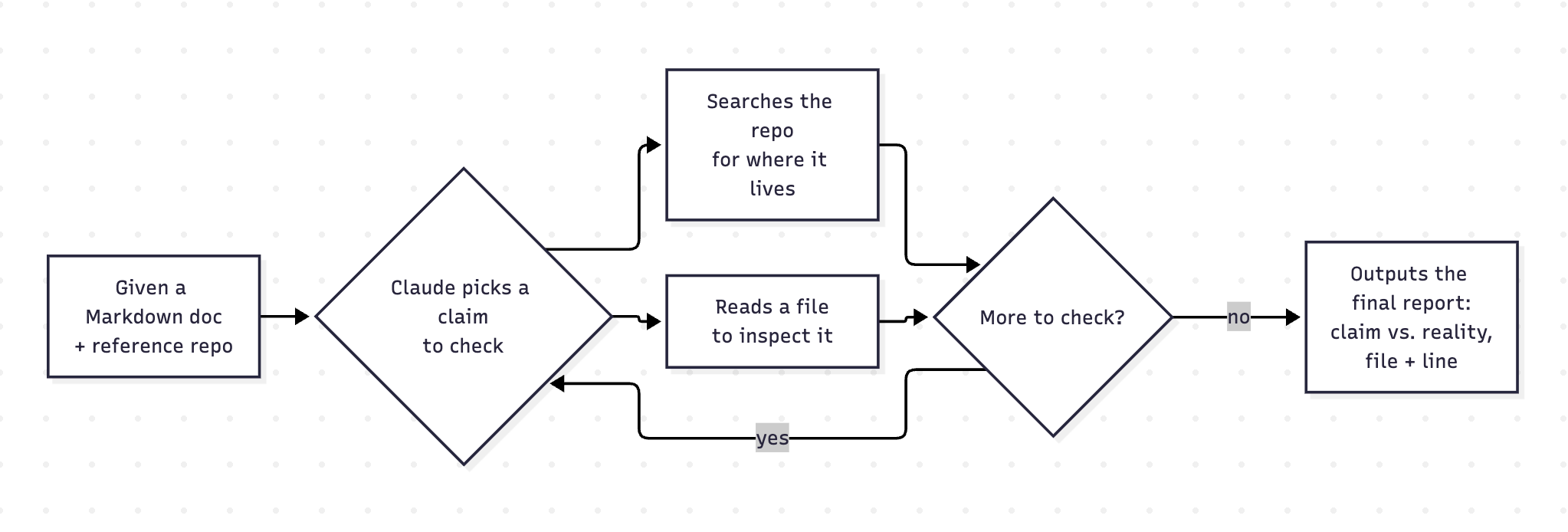
Documentation makes claims about code, and those claims can be wrong, whether the code changed later or the doc was wrong to begin with. This agent checks a doc’s code-related claims against a reference repository and reports which ones don’t hold up:
- You give the agent a Markdown doc and a reference repository.
- Claude reads the whole doc and picks a claim worth checking.
- It searches the repo, reads specific files, or both, however many times it needs, until it’s checked that claim.
- It repeats steps 2 and 3 for every checkable claim in the doc.
- Once done, it writes a final report: each inaccurate claim, what the doc says versus what the code actually shows, with a file and line reference.
Steps 2 and 3 are the “agentic” part. Claude isn’t just answering a question once, it’s repeatedly asking your code to go fetch more information before it commits to an answer.
Prerequisites
- Python 3.12+
git, available on yourPATH- A Claude API key, from an account with billing enabled
Project Setup
-
Create a project directory and a virtual environment:
mkdir doc-quality-agent && cd doc-quality-agent python3 -m venv venv source venv/bin/activate -
Install the two dependencies this script needs:
pip install anthropic python-dotenvanthropic: Claude’s Python SDK.python-dotenv: Loads variables from a.envfile into the environment, so your API key doesn’t have to live in the script itself.
-
Create an empty
agent.py. This is the one file the rest of this tutorial builds up:touch agent.py -
Create a
.envfile in the same directory:ANTHROPIC_API_KEY=INSERT_API_KEYIf you’re in a git repo, add
.envto.gitignoreright now, before your first commit. An API key committed to git history is compromised the moment it’s pushed, even if you delete it in a later commit.
Import Dependencies and Initialize the Client
At the top of agent.py:
import anthropic
import subprocess
from dotenv import load_dotenv
from pathlib import Path

load_dotenv()

client = anthropic.Anthropic()subprocess: You’ll use it to shell out togit grep.pathlib.Path: For the file-reading tool, so paths get resolved and compared safely instead of as raw strings.load_dotenv(): Reads.envand setsANTHROPIC_API_KEYas an actual environment variable, as if you’d exported it in your shell.anthropic.Anthropic(): Reads that environment variable automatically and returns a client object. Every call to Claude for the rest of this file goes throughclient.
Write the System Instructions
Claude needs to be told what job it’s doing before it sees the doc or the tools. This is the system prompt. It is a string passed separately from the conversation itself, that directs Claude’s behavior for the whole run rather than being one message among many.
Add this next:
instructions = (
    "You are a documentation quality auditor. "
    "You'll be given a Markdown document and access to a reference repository.\n\n"
    "Check every code-related claim in the document against the actual repository. "
    "Use the search_code tool to find relevant code, and the read_file tool to inspect it in full.\n\n"
    "Flag any mismatches between what the document says and what the code actually does.\n\n"
    "When you're done auditing the entire document, report each inaccurate claim you found: "
    "what the document says, what the code actually shows, and the file and line number as reference."
)
Notice it already references search_code and read_file by name, even though you haven’t written them yet. That’s fine, Python doesn’t evaluate this until it’s used, and you’re about to define both.
Define the Tool Schemas
A tool, in Claude’s API, is a plain JSON description of a function: its name, what it does, and what arguments it takes. It is written as a JSON Schema.
You send that description to Claude alongside your messages. Claude never runs your code directly, it only sees this schema, and decides from it whether to call the tool and what arguments to send. When it decides to call one, the response contains a structured request naming the tool and those arguments. Running the function and sending back a result is your code’s job, which you’ll write next.
Add the schema for both tools you’re about to build:
tools = [
    {
        "name": "search_code",
        "description": "Searches the reference repository for a pattern and returns any matching lines with the file and line number.",
        "input_schema": {
            "type": "object",
            "properties": {
                "pattern": {
                    "type": "string",
                    "description": "The term or code pattern to search for, e.g. a function name, variable, or string.",
                }
            },
            "required": ["pattern"],
        },
    },
    {
        "name": "read_file",
        "description": "Reads the full contents of a specific file in the reference repository, given a path relative to the repository root.",
        "input_schema": {
            "type": "object",
            "properties": {
                "file_path": {
                    "type": "string",
                    "description": "Path to the file, relative to the repository root, often found via a search_code result.",
                }
            },
            "required": ["file_path"],
        },
    },
]
Both schemas take only one argument each, pattern and file_path respectively, because those are the only two pieces of information that only Claude can decide. Neither schema mentions the repository’s path since it’s fixed for the entire run and your own code already has it.
Build the Search Code Tool
This is the half of the tool that actually runs. Claude can’t search a repository it’s never seen the layout of, so give it a way to go from a vague claim in the doc (“the client retries failed requests”) to an actual file, by searching for a term:
def search_code(repo_path, pattern):
    result = subprocess.run(
        ["git", "grep", "-n", pattern], cwd=repo_path, capture_output=True, text=True
    )

    if result.returncode == 0:
        return result.stdout
    elif result.returncode == 1:
        return f"No matches found for: {pattern}"
    else:
        return result.stderr
This shells out to git grep -n <pattern> in the repo directory. Its exit code tells you what happened: 0 means at least one match, 1 means no matches. Anything else means something broke.
- Inputs:
repo_path(a string, the local path to a cloned git repository),pattern(a string, the search term, chosen by Claude at runtime). - Output: A string. Either the matching lines (one per line, formatted as
path/to/file:line_number:matched line), a plain “no matches” message, or git’s own error text.
Checkpoint: test search_code
-
Clone a real repository to search against. You’ll reuse it for every checkpoint below and for the final end-to-end run:
git clone https://github.com/anthropics/anthropic-sdk-python.git -
From your project root, open a Python REPL and import the function:
python3 >>> from agent import search_code -
Search for a pattern you know exists:
>>> search_code("anthropic-sdk-python", "max_tokens")Expect a multi-line string of matches, something starting with a line like
README.md:NN: max_tokens=1024,. -
Search for something that doesn’t exist:
>>> search_code("anthropic-sdk-python", "this_pattern_should_not_exist_anywhere")Expect exactly:
'No matches found for: this_pattern_should_not_exist_anywhere' -
Search a path that isn’t a git repo at all:
>>> search_code("/tmp", "anything")Expect a
giterror string, along the lines of'fatal: not a git repository...'.
Note: Python loads a module once, at import time. If you edit agent.py after python3 -i / the REPL is already open, your import is stale. Exit and restart the REPL, or run import importlib; importlib.reload(agent) if you imported the module itself rather than individual names.
Build the Read File Tool
search_code tells Claude where something might live. This tool answers the next question: “what does that file actually say?”
Once Claude has a path (either from a search result or because the doc names a file directly), this reads the whole thing so Claude has full context, not just the one matching line:
def read_file(repo_path, file_path):
    absolute_repo_path = Path(repo_path).resolve()
    resolved_file_path = (absolute_repo_path / file_path).resolve()

    if not resolved_file_path.is_relative_to(absolute_repo_path):
        return f"Error: {file_path} is outside the repository."
    if not resolved_file_path.exists():
        return f"Error: {file_path} does not exist."

    try:
        return resolved_file_path.read_text()
    except UnicodeDecodeError:
        return f"Error: {file_path} is not a text file."
file_path comes from Claude, not a trusted caller, so the function validates it before reading anything. It must resolve to somewhere inside the repo, and it must exist. Once validated, it reads the file and returns its text, with one last fallback for the rare case the file isn’t text at all.
- Inputs:
repo_path(a string, same repo root assearch_code),file_path(a string, relative to that root). - Output: A string. The file’s full contents, or one of three
"Error: ..."strings.
Checkpoint: test read_file
-
Reusing the same clone, open a Python REPL and import the function:
python3 >>> from agent import read_file -
Read a file you know exists:
>>> read_file("anthropic-sdk-python", "src/anthropic/_constants.py")Expect the full file contents, including a line like
DEFAULT_MAX_RETRIES = 2. -
Try a path-traversal attempt:
>>> read_file("anthropic-sdk-python", "../../../etc/passwd")Expect exactly:
'Error: ../../../etc/passwd is outside the repository.' -
Try a path that doesn’t exist:
>>> read_file("anthropic-sdk-python", "no/such/file.py")Expect exactly:
'Error: no/such/file.py does not exist.'
Dispatch Claude’s Tool Calls
When Claude wants to use a tool, the response contains a block with a name (which tool) and an input (a dict of arguments). That block is just data describing a request, not an actual function call. Your code is what turns it into a real call to search_code or read_file. Write that translation as its own function:
def run_tool(name, tool_input, repo_path):
    if name == "search_code":
        return search_code(repo_path, tool_input["pattern"])
    elif name == "read_file":
        return read_file(repo_path, tool_input["file_path"])
    return f"Error: Unknown tool: {name}"
This is also where repo_path gets reunited with the arguments Claude actually sent. Recall that the tool schemas never mention repo_path, since it isn’t Claude’s to decide. Here, your own code supplies it directly, alongside whatever Claude put in tool_input.
- Inputs:
name(a string, e.g."search_code"),tool_input(a dict, e.g.{"pattern": "max_tokens"}),repo_path(a string, supplied by your code, never by Claude). - Output: whatever
search_code/read_filereturns, always a string, or the fallback error string for a name your schemas don’t define (defensive, since a model can in principle hallucinate a tool name).
Checkpoint: test run_tool
-
Import the function:
python3 >>> from agent import run_tool -
Call it as if you were Claude, without needing a live API call:
>>> run_tool("search_code", {"pattern": "max_tokens"}, "anthropic-sdk-python")
>>> run_tool("read_file", {"file_path": "src/anthropic/_constants.py"}, "anthropic-sdk-python")
>>> run_tool("delete_everything", {}, "anthropic-sdk-python")
The first two should match what you already saw when you tested
search_codeandread_filedirectly. The third should return'Error: Unknown tool: delete_everything'.
Create the Audit Function
Every piece so far (instructions, tools, search_code, read_file, run_tool) exists to be used by one function that ties them together. This is the entry point the rest of your program calls:
def audit_doc(doc_path: Path, repo_path: str):
    doc_contents = doc_path.read_text()

    messages = [{"role": "user", "content": doc_contents}]

    response = client.messages.create(
        model="claude-sonnet-5",
        max_tokens=4096,
        messages=messages,
        system=instructions,
        tools=tools,
        tool_choice={"type": "auto"},
    )
It reads the whole doc into a string, sends it as the first message with role: "user", exactly as if a person had pasted the doc into a chat, and passes along system=instructions and tools=tools from earlier, plus tool_choice={"type": "auto"} so Claude decides for itself whether it needs a tool before responding.
- Inputs:
doc_path(aPathto the Markdown file to check),repo_path(a string, the local path to an already-cloned repository;audit_docdoesn’t clone anything itself). - Output: once
audit_docis complete, it will print Claude’s final report to the terminal with each inaccurate claim, what the doc says, what the code actually shows, and a file/line reference.
Note: max_tokens caps a single response, not the whole conversation, so set it generously to avoid cutting off the final report.
The client.messages.create(...) call returns a response object with a stop_reason field. If stop_reason="tool_use", Claude decided it needs to call a tool before it can continue.
This function isn’t testable on its own yet. It has no loop, so anything past the first tool request goes unhandled. The real test comes once the loop and final report below are in place.
Create The Agentic Loop
This is the part that makes the script “agentic” rather than a single request/response. The Claude API is stateless between calls: it has no memory of a previous turn unless you resend the entire conversation history yourself, every time. That’s the core mechanic the loop below is built around. Each pass appends what just happened to messages, then calls the API again with the full history so far.
Add this loop to the audit_doc function right after the first client.messages.create() call:
    while response.stop_reason == "tool_use":
        tool_results = []
        for block in response.content:
            if block.type == "tool_use":
                result = run_tool(block.name, block.input, repo_path)
                tool_results.append({
                    "type": "tool_result",
                    "tool_use_id": block.id,
                    "content": result,
                })

        messages.append({"role": "assistant", "content": response.content})
        messages.append({"role": "user", "content": tool_results})

        response = client.messages.create(
            model="claude-sonnet-5",
            max_tokens=4096,
            messages=messages,
            system=instructions,
            tools=tools,
            tool_choice={"type": "auto"},
        )
Here’s what happens on each pass through the loop:
- Each
tool_useblock gets run throughrun_tool, which is wheresearch_codeorread_fileactually gets called. Its result becomes atool_result, tagged with the block’sidastool_use_id. - Claude’s turn and the tool results get appended to
messages, as"assistant"and a single"user"message. - The API is called again, and the loop re-checks
stop_reasonto continue or exit.
There isn’t a way to unit-test this loop in isolation. It needs a live model deciding what to do next, so you’ll test in the end-to-end run below.
Extract and Print the Report
Once the loop exits, stop_reason is no longer "tool_use", which means response.content holds a plain text block instead. This is Claude’s final answer. Pull it out and print it:
    final_text = next(block for block in response.content if block.type == "text")
    print(final_text.text)
next(... for ... if ...) walks response.content and returns the first block whose type is "text", skipping any leftover non-text blocks. This completes the audit_doc function.
View the complete agent.py script
import anthropic
import subprocess
from dotenv import load_dotenv
from pathlib import Path

load_dotenv()

client = anthropic.Anthropic()

instructions = (
    "You are a documentation quality auditor. "
    "You'll be given a Markdown document and access to a reference repository.\n\n"
    "Check every code-related claim in the document against the actual repository. "
    "Use the search_code tool to find relevant code, and the read_file tool to inspect it in full.\n\n"
    "Flag any mismatches between what the document says and what the code actually does.\n\n"
    "When you're done auditing the entire document, report each inaccurate claim you found: "
    "what the document says, what the code actually shows, and the file and line number as reference."
)

tools = [
    {
        "name": "search_code",
        "description": "Searches the reference repository for a pattern and returns any matching lines with the file and line number.",
        "input_schema": {
            "type": "object",
            "properties": {
                "pattern": {
                    "type": "string",
                    "description": "The term or code pattern to search for, e.g. a function name, variable, or string.",
                }
            },
            "required": ["pattern"],
        },
    },
    {
        "name": "read_file",
        "description": "Reads the full contents of a specific file in the reference repository, given a path relative to the repository root.",
        "input_schema": {
            "type": "object",
            "properties": {
                "file_path": {
                    "type": "string",
                    "description": "Path to the file, relative to the repository root, often found via a search_code result.",
                }
            },
            "required": ["file_path"],
        },
    },
]


def search_code(repo_path, pattern):
    result = subprocess.run(
        ["git", "grep", "-n", pattern], cwd=repo_path, capture_output=True, text=True
    )

    if result.returncode == 0:
        return result.stdout
    elif result.returncode == 1:
        return f"No matches found for: {pattern}"
    else:
        return result.stderr


def read_file(repo_path, file_path):
    absolute_repo_path = Path(repo_path).resolve()
    resolved_file_path = (absolute_repo_path / file_path).resolve()

    if not resolved_file_path.is_relative_to(absolute_repo_path):
        return f"Error: {file_path} is outside the repository."
    if not resolved_file_path.exists():
        return f"Error: {file_path} does not exist."

    try:
        return resolved_file_path.read_text()
    except UnicodeDecodeError:
        return f"Error: {file_path} is not a text file."


def run_tool(name, tool_input, repo_path):
    if name == "search_code":
        return search_code(repo_path, tool_input["pattern"])
    elif name == "read_file":
        return read_file(repo_path, tool_input["file_path"])
    return f"Error: Unknown tool: {name}"


def audit_doc(doc_path: Path, repo_path: str):
    doc_contents = doc_path.read_text()

    messages = [{"role": "user", "content": doc_contents}]

    response = client.messages.create(
        model="claude-sonnet-5",
        max_tokens=4096,
        messages=messages,
        system=instructions,
        tools=tools,
        tool_choice={"type": "auto"},
    )

    while response.stop_reason == "tool_use":
        tool_results = []
        for block in response.content:
            if block.type == "tool_use":
                result = run_tool(block.name, block.input, repo_path)
                tool_results.append({
                    "type": "tool_result",
                    "tool_use_id": block.id,
                    "content": result,
                })

        messages.append({"role": "assistant", "content": response.content})
        messages.append({"role": "user", "content": tool_results})

        response = client.messages.create(
            model="claude-sonnet-5",
            max_tokens=4096,
            messages=messages,
            system=instructions,
            tools=tools,
            tool_choice={"type": "auto"},
        )

    final_text = next(block for block in response.content if block.type == "text")
    print(final_text.text)
Run It End-to-End
Save the following as examples/anthropic_sdk_doc.md, a real-looking SDK doc with three inaccuracies planted on purpose, so you have something concrete for the agent to catch:
View examples/anthropic_sdk_doc.md
# Using the Anthropic Python SDK

## Installation

```
pip install anthropic
```

## Creating a client

```python
import anthropic

client = anthropic.Anthropic()
```

If you don't pass `api_key` explicitly, the client reads it from the
`ANTHROPIC_API_KEY` environment variable.

## Sending a message

```python
message = client.messages.create(
    model="claude-sonnet-5",
    max_tokens=1024,
    messages=[{"role": "user", "content": "Hello, world"}],
)
```

If you omit `max_tokens`, it defaults to 1024.

## Automatic retries

By default, the client automatically retries a failed request up to 5 times
before raising an error.

## Streaming responses

You can stream a response incrementally using `client.messages.stream_response()`
as a context manager, rather than waiting for the full response to complete.

## Async usage

For async code, use `anthropic.AsyncAnthropic()` instead. It mirrors the same
methods as the synchronous client, but you `await` them.
Reuse the anthropic-sdk-python clone from the earlier checkpoints (or clone a fresh one). Then, from your project root:
python3
>>> from pathlib import Path
>>> from agent import audit_doc
>>> audit_doc(Path("examples/anthropic_sdk_doc.md"), "anthropic-sdk-python")
This exercises everything you built: the doc gets read, Claude decides what’s worth checking, the loop runs search_code/read_file as many times as it needs, and the final report prints to your terminal.
All three planted inaccuracies are real and independently verifiable against the SDK’s own source, so expect a report that flags something close to:
1. Claim: "If you omit `max_tokens`, it defaults to 1024."
   Reality: src/anthropic/resources/messages/messages.py:122, `max_tokens` is a required argument, it has no default.

2. Claim: "By default, the client automatically retries a failed request up to 5 times before raising an error."
   Reality: src/anthropic/_constants.py:8, `DEFAULT_MAX_RETRIES = 2`.

3. Claim: "You can stream a response incrementally using `client.messages.stream_response()`."
   Reality: src/anthropic/resources/messages/messages.py:1010, the actual method is `stream()`, not `stream_response()`.
Where to Go From Here
What you’ve built is deliberately minimal, enough to show how the pieces fit together. A few ways to build on it:
- CLI wrapper: Accept a doc path and a GitHub URL, clone to a temp directory, then call
audit_doc. Seecli.pyand thedocs-auditentry point inpyproject.tomlfor a reference. - Bound the loop, handle failures: Cap how many times the
whileloop can run, and wrap theclient.messages.createcalls intry/exceptso an auth error or rate limit doesn’t just crash. - Structured output: Have Claude return a list of claims with a pass/fail verdict each, instead of prose, so
cli.pycan exit non-zero in CI when something’s wrong. - A
list_filestool: Lets Claude browse the repo’s structure, instead of only finding files by search pattern or ones the doc names directly. - Tool Runner SDK helper (
client.beta.messages.tool_runner, beta): A drop-in alternative to the hand-rolled loop above. Refer to the Tool runner (SDK) docs for more information.